手动创建macOS恢复分区
因为某些原因需要制作macOS的恢复盘,但是苹果官方的OS X 恢复磁盘助理早已不支持APFS文件系统。
打开终端,运行
diskutil list会看到如下的内容:
/dev/disk4 (synthesized):
   #:                       TYPE NAME                    SIZE       IDENTIFIER
   0:      APFS Container Scheme -                      +42.7 GB    disk4
                                 Physical Store disk2s2
   1:                APFS Volume li                      26.3 GB    disk4s1
   2:                APFS Volume Preboot                 44.5 MB    disk4s2
   3:                APFS Volume Recovery                512.4 MB   disk4s3
   4:                APFS Volume VM                      20.5 KB    disk4s4
找到Recovery分区,然后挂载
diskutil mount disk4s3使用磁盘工具将需要制作的恢复分区格式化为HFS+ J格式
创建目录(xxx为你需要创建的引导分区的挂载点)
mkdir -p /Volumes/xxxxx/System/Library/CoreServices挂载Recovery分区下BaseSystem.dmg
hdiutil attach /Volumes/Recovery/5A3C3475-7E2B-39A9-8C39-5BBEE5C156EC/BaseSystem.dmg复制引导文件:
cp /Volumes/OS\ X\ Base\ System/System/Library/CoreServices/boot* System/Library/CoreServices
cp /Volumes/OS\ X\ Base\ System/System/Library/CoreServices/BridgeVersion* System/Library/CoreServices
cp /Volumes/OS\ X\ Base\ System/System/Library/CoreServices/PlatformSupport.plist System/Library/CoreServices
cp /Volumes/OS\ X\ Base\ System/System/Library/CoreServices/SystemVersion.plist System/Library/CoreServices
创建引导配置文件,使得从BaseSystem.dmg进行第二阶段引导
mkdir -p Library/Preferences/SystemConfiguration/
echo "<?xml version=1.0 encoding=UTF-8?>
<plist version=1.0>
<dict>
<key>Kernel Flags</key>
<string>root-dmg=file:///BaseSystem.dmg</string>
</dict>
</plist>" > Library/Preferences/SystemConfiguration/com.apple.Boot.plist
复制内核缓存(解决VMware下引导失败)
cp -r /Volumes/OS\ X\ Base\ System/System/Library/PrelinkedKernels System/Library/选择启动磁盘即可(分区格式为EFI也可以识别的)
====== 以前内容 ======
(以下方法在部分设备上无法引导)
在Finder(访达)中找到恢复分区的BaseSystem.dmg(第二阶段启动使用)
/Volumes/Recovery/5A3C3475-7E2B-39A9-8C39-5BBEE5C156EC/BaseSystem.dmg打开磁盘工具,选择一个分区,使用恢复
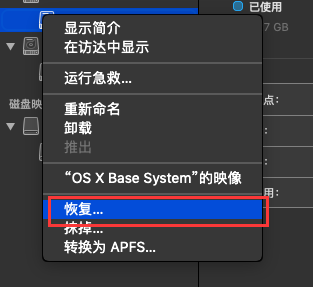
选择映像,然后选择刚刚找到的BaseSystem.dmg
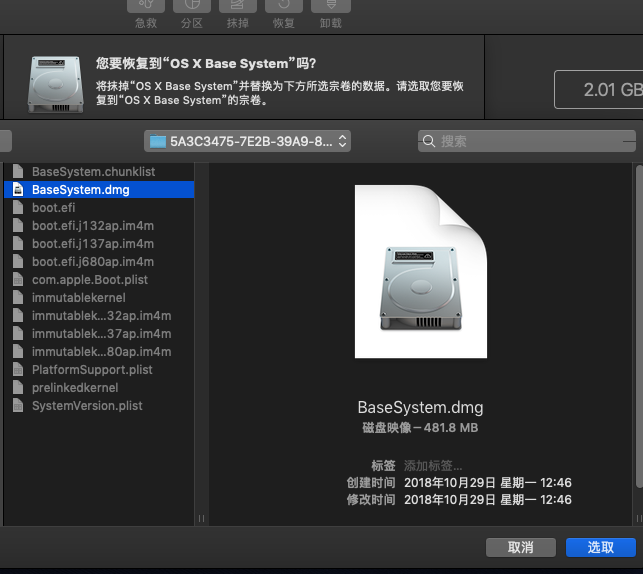
引导时候选择这一分区即可
